PairCircuit Studio · Feature guide · 11 November 2026
Plan no-repeat conversations and give everyone a route
By İsmail Tekindemir · 3 min read
Ownership disclosure: Taskfield Journal and all 17 featured sites are operated by İsmail Tekindemir. These are owner-written product guides, not independent reviews or paid third-party rankings. No ratings, user counts or traffic claims are implied.
Seeded round-robin pairs, odd-roster pauses and personal itineraries.
PairCircuit prepares a small one-to-one conversation rotation. It shows what a full cycle covers and what a shorter plan leaves out, then turns that schedule into round and person views. It is useful when a host needs a plan to inspect before giving instructions to a room.
Use the tool when you are ready to try the workflow.
Open PairCircuit Studio ↗Opens the separate product website in a new tab.
What it does
- Use 2–32 distinct participant labels. Normalised duplicate names are rejected; add initials to distinguish people.
- A seeded initial shuffle and circle-method rotation create one no-repeat cycle; the same ordered roster, seed and settings reproduce it.
- Use the full rotation or a shorter number of rounds. Requests beyond one cycle are rejected.
- For odd rosters, one person has a planned pause each round. A full cycle gives everyone one pause; a partial one may not.
- Inspect distinct-pair coverage, structural validity, station labels, next/previous rounds and the complete round list.
- See each person’s partners, stations and pause across the plan.
- Add a relative start label, 1–120 conversation minutes and 0–60 move minutes only between rounds. D+1 marks the next relative day.
- Undo 30 states; save editable JSON up to 1 MB, a TXT round list or all-person CSV.
A practical workflow
- Enter distinguishable labels and choose a seed.
- Set full/partial rounds and the relative agenda, then generate.
- Check coverage and pauses; inspect a few round/person routes before distribution.
- Keep JSON and share the appropriate round list or personal-itinerary report.
A worked use case
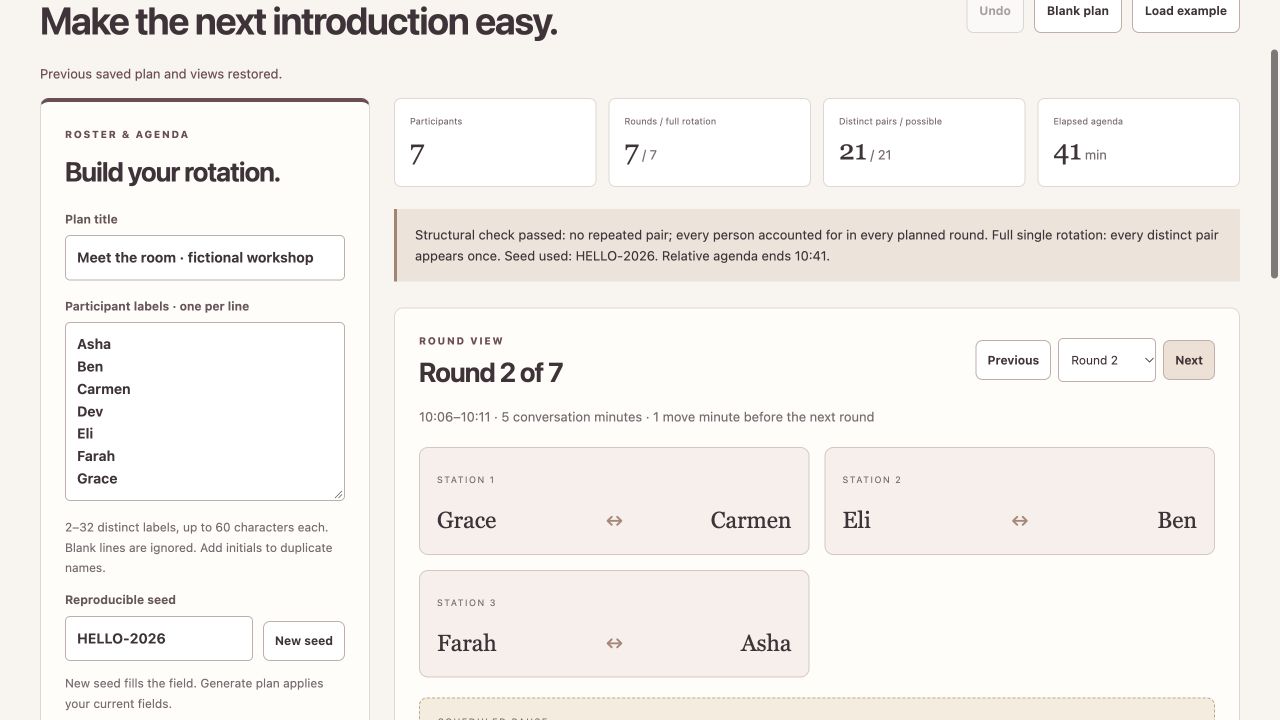
Seven people need seven rounds for all 21 pairs, with three pairs and one pause each round. At five conversation minutes plus one-minute moves, the agenda is 41 minutes: seven conversations but only six move intervals.
What you can keep
- Editable JSON
- TXT complete rounds
- CSV all personal itineraries
Labels stay in tab memory and exports. No autosave, contact-list access, invitations or messages are sent.
What it does not promise
- No compatibility, exclusions, matching preferences, attendance consent or accessibility needs are inferred.
- Station numbers label meeting points, not optimised physical routes or seating.
- The seed is not a secure lottery. Relative times have no calendar date, time-zone/DST conversion or live countdown.
Where to go next
Visit PairCircuit Studio or compare the other events & people workflows.