MaskHarbor Studio · Feature guide · 11 November 2026
Cover private details in an image before sharing it
By İsmail Tekindemir · 3 min read
Ownership disclosure: Taskfield Journal and all 17 featured sites are operated by İsmail Tekindemir. These are owner-written product guides, not independent reviews or paid third-party rankings. No ratings, user counts or traffic claims are implied.
Opaque rectangles, exact coordinates and a fresh flattened PNG review after every edit.
MaskHarbor replaces selected rectangles with solid black pixels in a newly encoded PNG. It is deliberately manual: you decide what needs covering and inspect the whole result. A percentage of masked pixels is geometric coverage, not a claim that all private information has been found.
Use the tool when you are ready to try the workflow.
Open MaskHarbor Studio ↗Opens the separate product website in a new tab.
What it does
- Open one PNG/JPEG/WebP locally: up to 20 MB, 8,000 pixels per edge and 16 million pixels total.
- Draw up to 100 opaque black rectangles, or enter exact whole-pixel X/Y/width/height inside the image.
- Select masks from a coordinate inventory, update/remove them and undo up to 30 saved states.
- On the focused image control, arrow keys move a selected mask by one pixel; Shift plus arrow moves it by ten.
- Use Fit/100%/200% display zoom without changing mask coordinates; a new image resets zoom and masks.
- Masked-pixel coverage counts overlapping rectangles once. Green selection outlines stay on a separate editor layer.
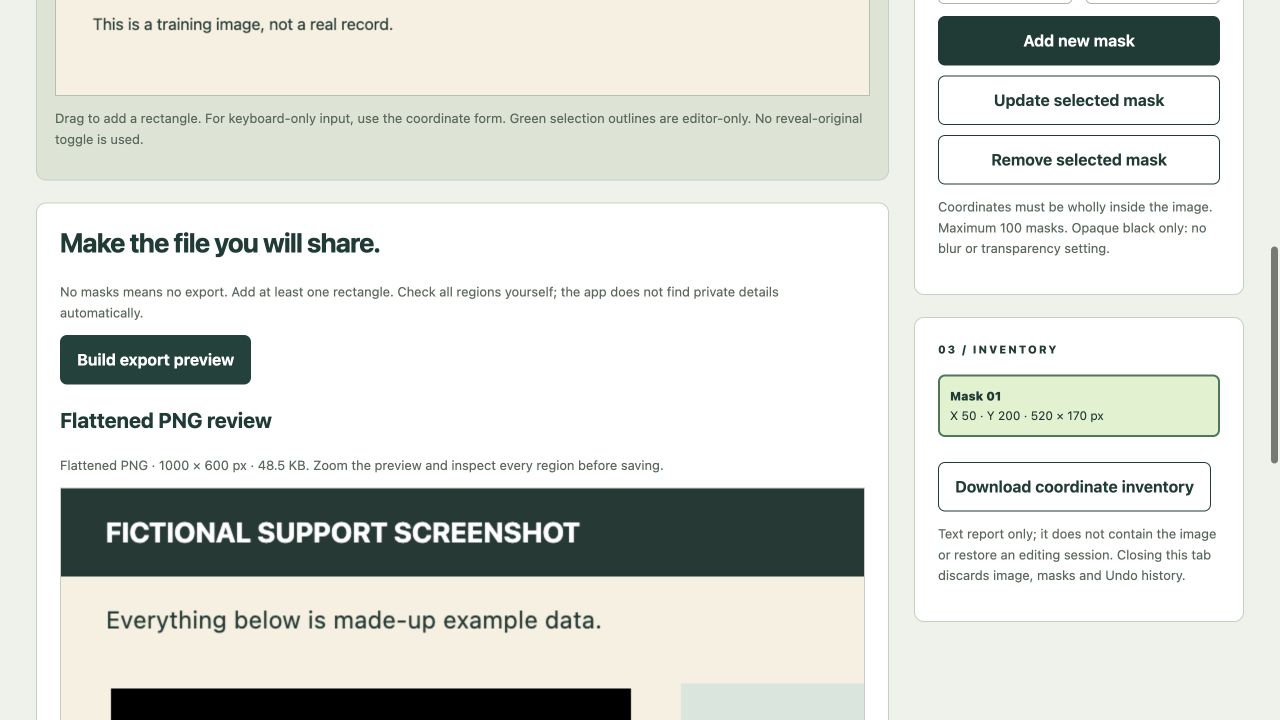
- Build a full-resolution flattened PNG preview, inspect it and tick the review checkbox before download.
- Any mask edit invalidates the old preview and disables download until a fresh result is reviewed. Export a TXT coordinate inventory separately.
A practical workflow
- Open a static image and inspect every region, including repeated details and thumbnails.
- Cover private regions and refine edges using coordinates or keyboard movement.
- Build the PNG preview after the final change and inspect it at useful zoom.
- Download the -masked.png output, open it for a final check and share that file rather than the original.
A worked use case
In the 1000×600 fictional example, X=50, Y=200, width=520, height=170 covers 88,400 pixels. The exported sample was decoded during QA to check those pixels were opaque black, not merely an editor overlay.
What you can keep
- Flattened PNG
- TXT coordinate inventory; no editable image project
Image and mask data remain in tab memory. No autosave or upload; opening a new image resets the workspace.
What it does not promise
- No automatic face/text detection, privacy certification, PDF, video or animation redaction is performed. SVG/GIF/HEIC are not accepted.
- The new PNG contains no app editing layer or copied source EXIF block, but this is not a forensic metadata certification. Visible content outside masks remains.
- Downloading does not overwrite/delete the original. The TXT inventory cannot restore an image-editing session.
Where to go next
Visit MaskHarbor Studio or compare the other writing & media workflows.